Seven states, simple geometry, and continuous changes in form.
a thinking indicator is a small part of an interface, but you can spend a surprising amount of time looking at it. i’m interested in how something that simple can have character and still belong to the product around it.
in the breakdown i shared of the Sim thinking loader, i described seven states: Dispatch, Return, Orchestrate, Think, Formation, Work, and Stand By. the geometry comes from circles, bars, and arcs arranged on a grid.
A small set of shapes
the construction starts on a 100-unit square. keeping every state in the same coordinate system gives the parts a shared center and a consistent scale. a circle can move between two bars, four circles can gather around the center, and arcs can form a ring.
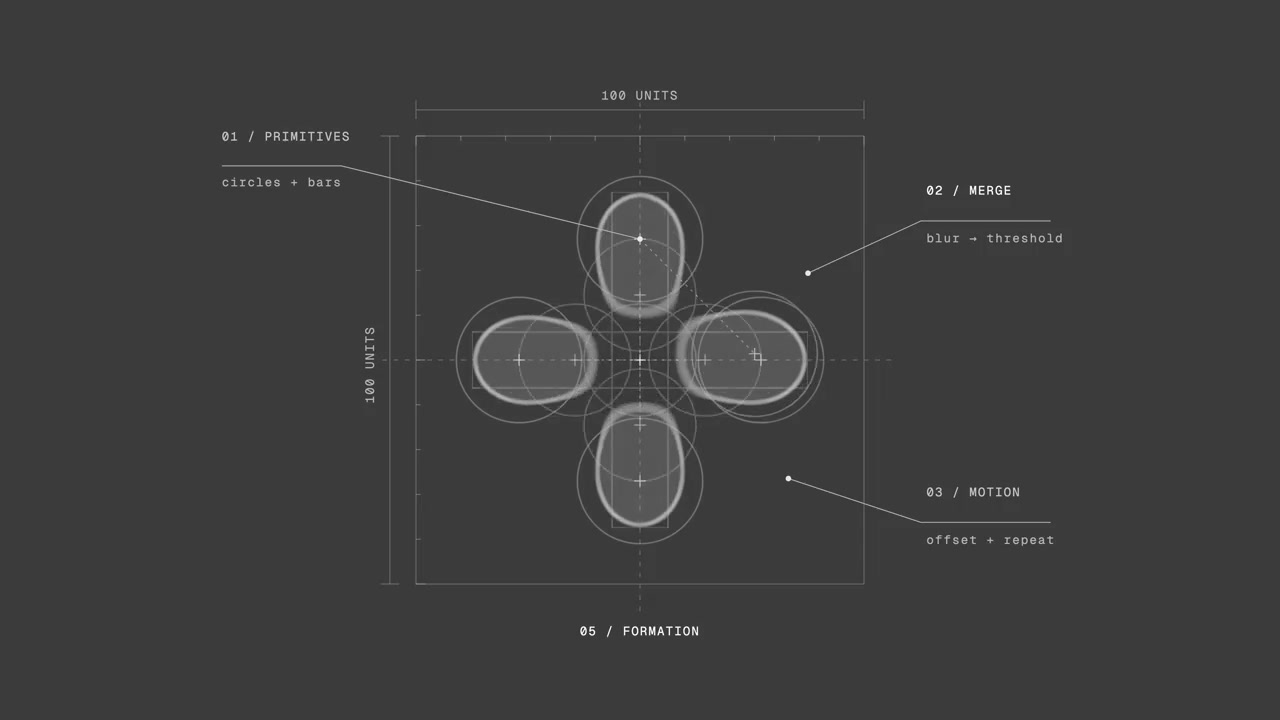
the shapes stay simple. the interesting part is how far they move, when they overlap, and what happens to the edges between them. the code below focuses on Dispatch and Formation. it keeps their geometry and timing, using one solid color so the construction is easier to read.
Where the edges meet
the merge has two steps. Gaussian blur softens the shapes into a field of partially transparent edges. the color matrix then steepens that transparency, bringing the result back toward a solid silhouette. when nearby blurred edges overlap enough, a bridge appears between the shapes.
the filter belongs on the parent group. that way it receives the shapes together, including the space where their edges meet. filtering each circle separately would keep those operations separate.
<svg class="thinking-loader" viewBox="0 0 100 100"
  width="100" height="100" role="img" aria-label="Thinking"
  xmlns="http://www.w3.org/2000/svg">
  <defs>
    <filter id="loader-merge" x="-30%" y="-30%"
      width="160%" height="160%"
      color-interpolation-filters="sRGB">
      <feGaussianBlur in="SourceGraphic" stdDeviation="5" result="blur" />
      <feColorMatrix in="blur" type="matrix" values="
        1 0 0  0  0
        0 1 0  0  0
        0 0 1  0  0
        0 0 0 19 -9" />
    </filter>
    <clipPath id="loader-clip">
      <rect width="100" height="100" />
    </clipPath>
  </defs>
  <g filter="url(#loader-merge)" fill="currentColor">
    <g class="loader-state is-active" data-state="dispatch"
      clip-path="url(#loader-clip)">
      <circle class="loader-dispatch-left" cx="22" cy="50" r="16" />
      <circle class="loader-dispatch-right" cx="78" cy="50" r="16" />
    </g>
    <g class="loader-state" data-state="formation" opacity="0"
      clip-path="url(#loader-clip)">
      <circle cx="50" cy="23" r="14" />
      <circle cx="23" cy="50" r="14" />
      <circle cx="77" cy="50" r="14" />
      <circle cx="50" cy="77" r="14" />
      <circle class="loader-formation-mover" cx="50" cy="23" r="14" />
    </g>
  </g>
</svg>
the first three matrix rows leave the color channels alone. the last row changes alpha to 19 × alpha − 9, clamped between 0 and 1. faint edges disappear, stronger areas become solid, and a narrow transition remains between them. the clip keeps the source geometry inside the 100-unit square; the expanded filter region gives the blur room around those shapes.
try the seven states below to feel that relationship. choose a state, adjust the blur and speed, then switch merging off to see the source shapes in motion. this uses the original loader’s geometry and timing. it starts with Dispatch at normal speed and a 5-unit blur, the same blur used in the example above.
Give the shapes a rhythm
in Dispatch, the circles start at 22 and 78 on the horizontal axis. each travels 28 units toward the center, reaching it at 90% of the one-second animation and holding before playback reverses. only their positions change. the shared filter turns that changing distance into a connection that thickens and separates.
.thinking-loader { overflow: visible; }
.thinking-loader .loader-state {
  opacity: 0;
  transition: opacity 500ms ease-in-out;
}
.thinking-loader .loader-state.is-active { opacity: 1; }

.thinking-loader .loader-dispatch-left {
  animation: loader-dispatch-left 1s infinite alternate;
}
.thinking-loader .loader-dispatch-right {
  animation: loader-dispatch-right 1s infinite alternate;
}
@keyframes loader-dispatch-left {
  90%, 100% { transform: translateX(28px); }
}
@keyframes loader-dispatch-right {
  90%, 100% { transform: translateX(-28px); }
}

.thinking-loader .loader-formation-mover {
  animation: loader-formation 2s infinite;
}
@keyframes loader-formation {
  0%, 100% { transform: translate(0, 0); }
  25% { transform: translate(27px, 27px); }
  50% { transform: translate(0, 54px); }
  75% { transform: translate(-27px, 27px); }
}

@media (prefers-reduced-motion: reduce) {
  .thinking-loader :is(.loader-dispatch-left, .loader-dispatch-right,
    .loader-formation-mover) { animation: none; }
  .thinking-loader .loader-state { transition: none; }
}
Formation uses four stationary circles and a fifth moving circle. over two seconds, the moving circle visits the top, right, bottom, and left positions before returning to the top. the states share one visual language, but their rhythms can differ: a handoff, an orbit, a gathering, a breath.
Continuity between states
keep the outgoing and incoming state groups mounted inside the same filtered parent. changing their opacity lets both contribute during the handoff. the filter acts on that combined image, so the transition can form connections as well as fade.
function setLoaderState(loader, name) {
  const states = [...loader.querySelectorAll("[data-state]")];
  const next = states.find((state) => state.dataset.state === name);
  if (!next) return;

  for (const state of states) {
    state.classList.toggle("is-active", state === next);
  }
}

// Run after the SVG has mounted, when the application state changes.
const loader = document.querySelector(".thinking-loader");
if (loader) setLoaderState(loader, "formation");
the function changes the active group; the CSS handles the handoff. it leaves the geometry in place instead of replacing the SVG on every change. in a product, call it from the work the interface is doing. the preview above cycles through forms to show their range, but an application state doesn’t need to change just because a timer expired.
paste the SVG and CSS together for the Dispatch loop, then use the function to switch to Formation. give the filter and clip path unique IDs for each instance and update their matching URLs. the example leaves out the original tonal shading and the other five states so the shared construction is easier to follow.
that’s the detail i find interesting: a small set of parts can give you a lot of room to explore. the geometry gives you the vocabulary. spacing, overlap, and timing decide how it feels.